View Issue Details

IDProjectCategoryView StatusLast Update
0001292K18X001.00 SKB SWANSWpublic2021-07-22 08:53
Reporter(SW) Bcan Yeh Assigned To(SW) Bcan Yeh Due Date
PriorityhighSeveritys2-severeReproducibilityalways
Status closedResolutionfixed 
Summary0001292: Power off during OTA, there is a high ratio that SWAN can't boot normally.
DescriptionHi Mr.Yoon,

We did some OTA tests as below.
In Step1, if power off at 7%, 23%, 32%, 45%, 53%, 73%, 94%, SWAN can boot normally.
In Step2, if power off at 9%, 18%, SWAN can boot normally.
In Step2, if power off at 26%, 45%, 60%, 80%, 99%, SWAN can not boot normally.

The time of Step1+Step2(0-24%) is about 11 seconds and the time of Step2(25-100%) is about 96 seconds.The failure ratio is greater than 90%.If users accidentally powered off SWAN during OTA, the device can only be rescued by image+SPI card.

This issue is reported to Synaptics. Please refer to https://synaextjira.atlassian.net/browse/SKBSBALT-141.
According to the latest reply of Synaptics, this might be caused by OTA flow.
Please find SPTek members to clarify this issue with Synaptics.
TagsNo tags attached.
Attach Tags

Users monitoring this issue

User List (ALTech) JunGyu Kim , (ALTech) Juyoung Park , (ALTech) SY Yoon

Activities

(ALTech) SY Yoon

2021-07-12 12:11

developer   ~0007647

Hi Bcan Yeh,

If SWAN didn't boot normally, then how can we make it normal ?
Should we download boot image via SPI ?

(SW) Bcan Yeh

2021-07-12 14:30

developer   ~0007649

Hi Mr.Yoon,

Yes, if this problem happened, the only way to save the devices is to burn image through SPI card.

(SW) Bcan Yeh

2021-07-12 15:50

developer   ~0007651

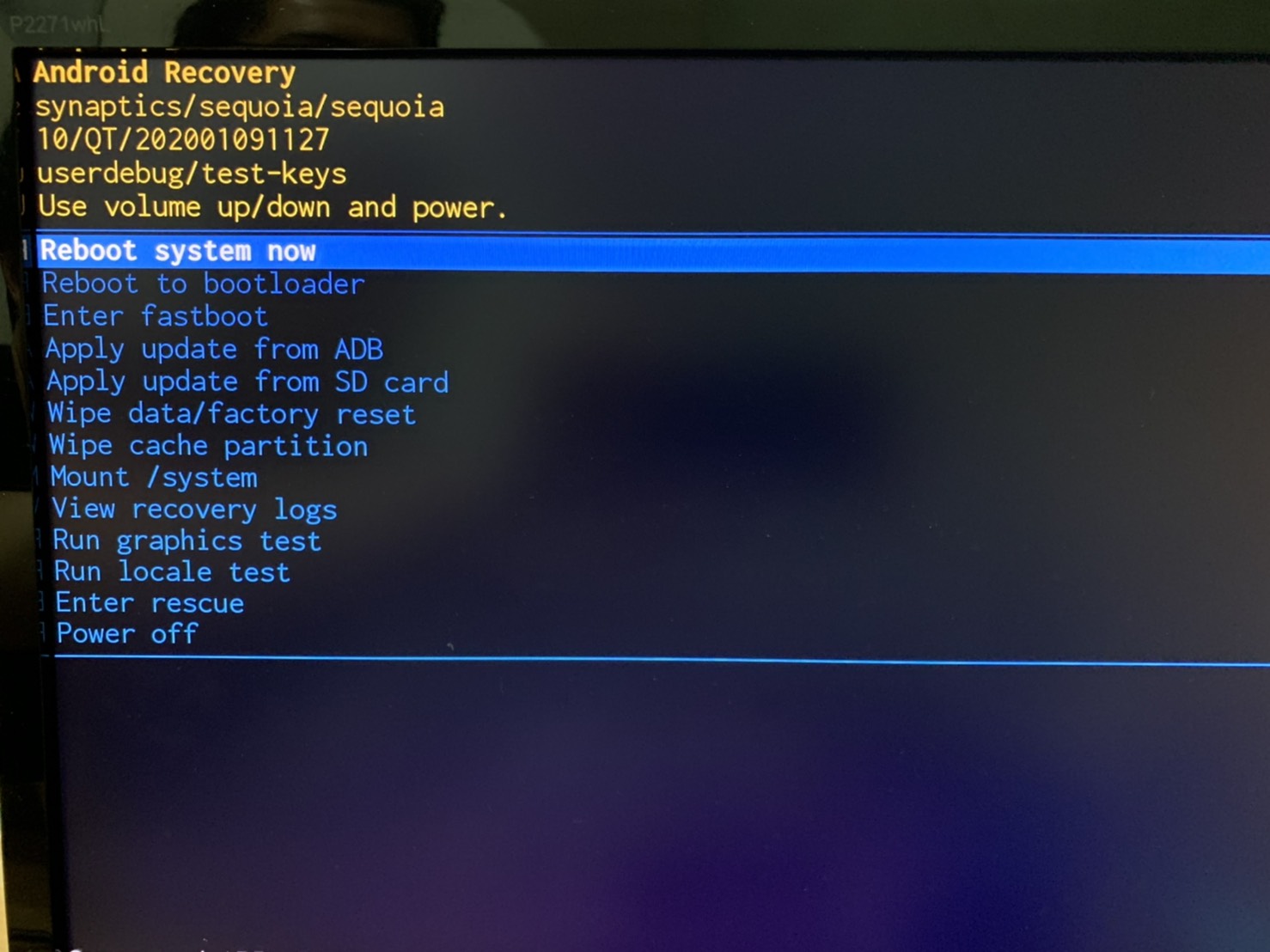
1. In Synaptics's EVK, there is only recovery UI for user to update fw.
   There are many functions related to update fw.
   Including
    a. Reboot system now
    b. Reboot to bootloader
    c. Enter fastboot
    d. Apply update from ADB
    e. Apply update from SD card
    f. Wipe data/factory reset
    g. Wipe cache partition
    i. Mount /system
    j. View recovery logs
    k. Run graphics test
    l. Run locale test
    m. Enter rescue
    n. Power off
   For a basic OTA, we need to do
   (1) Go to the recovery UI (command: reboot recovery)
   (2) Choose e. and select a ota file
   (3) Wait until e is completed (about 144 sec)
   (4) Reboot system now
  
2. In SWAN, SPTek combined some basic functions and made a smooth OTA flow. So users do not have to do each step one by one.
   And the recovery UI is also removed in SWAN.
   
3. For this issue.
   We can reproduce it in EVK with below steps.
   
   (1)Update synaptics EVK with eMMCimg [202001091127].
   (2)Boot up EVK, reboot recovery, Apply update from SD card
   (3)Update with ota file sequoia-ota-202004011336.zip
   (4)Power off at 30 sec.
   (5)Power on EVK and it show Android Recovery UI
   (6)Power off and on.
   (7)The problem happens.
      a. The screen shows boot logo and black screen repeatedly.
      b. The console shows specific log repeatedly.

   And Synaptics said the flow could be changed to show Android Recovery UI again after step (6).
   If so, there will be no problem.
   
   Because the OTA flow of Synaptics and SPTek are different, we can not distinguish where is the root cause.
   For clarifying this, it is necessary to have Synaptics and SPTek work together to solve this problem.
   
 ps. Attached picture is the recovery UI.
S__155590696.jpg (212,632 bytes)   

(SW) Bcan Yeh

2021-07-22 08:52

developer   ~0007711

While this problem happens
1. Power off
2. Keep pressing ch- and vol- on the front panel
3. Power on
4. Go to recovery mode.
5. In recovery mode, it will check usb disk for OTA file. If there is no OTA file found, the box will download OTA file from ftp server.
6. After OTA, it can boot up normally.

Issue History

Date Modified Username Field Change
2021-07-12 11:13 (SW) Bcan Yeh New Issue
2021-07-12 11:13 (SW) Bcan Yeh Status new => assigned
2021-07-12 11:13 (SW) Bcan Yeh Assigned To => (ALTech) SY Yoon
2021-07-12 12:07 (ALTech) SY Yoon Assigned To (ALTech) SY Yoon => (ALTech) Wooshin Kang
2021-07-12 12:07 (ALTech) SY Yoon Issue Monitored: (ALTech) SY Yoon
2021-07-12 12:07 (ALTech) SY Yoon Issue Monitored: (ALTech) Juyoung Park
2021-07-12 12:07 (ALTech) SY Yoon Issue Monitored: (ALTech) JunGyu Kim
2021-07-12 12:11 (ALTech) SY Yoon Note Added: 0007647
2021-07-12 14:30 (SW) Bcan Yeh Note Added: 0007649
2021-07-12 15:50 (SW) Bcan Yeh File Added: S__155590696.jpg
2021-07-12 15:50 (SW) Bcan Yeh Note Added: 0007651
2021-07-22 08:51 (SW) Bcan Yeh Assigned To (ALTech) Wooshin Kang => (SW) Bcan Yeh
2021-07-22 08:52 (SW) Bcan Yeh Status assigned => resolved
2021-07-22 08:52 (SW) Bcan Yeh Resolution open => fixed
2021-07-22 08:52 (SW) Bcan Yeh Note Added: 0007711
2021-07-22 08:53 (SW) Bcan Yeh Status resolved => closed